CI/CD Pipelines Explained in Simple Terms
Most people working in tech have heard of CI/CD pipelines, but beginners often see them as some kind of DevOps magic.
Most people working in tech have heard of CI/CD pipelines, but beginners often see them as some kind of DevOps magic.
A developer pushes code, tests run automatically, the application is built, and sometimes it is deployed without anyone manually executing each step.
The idea is simpler than it sounds.
A CI/CD pipeline is an automated process that checks, builds, and delivers software.
Think of It Like a Factory Assembly Line
The easiest way to understand a pipeline is to compare it to an assembly line in a factory.
A product moves through several stations, and each station performs a specific task.
A software pipeline works the same way.
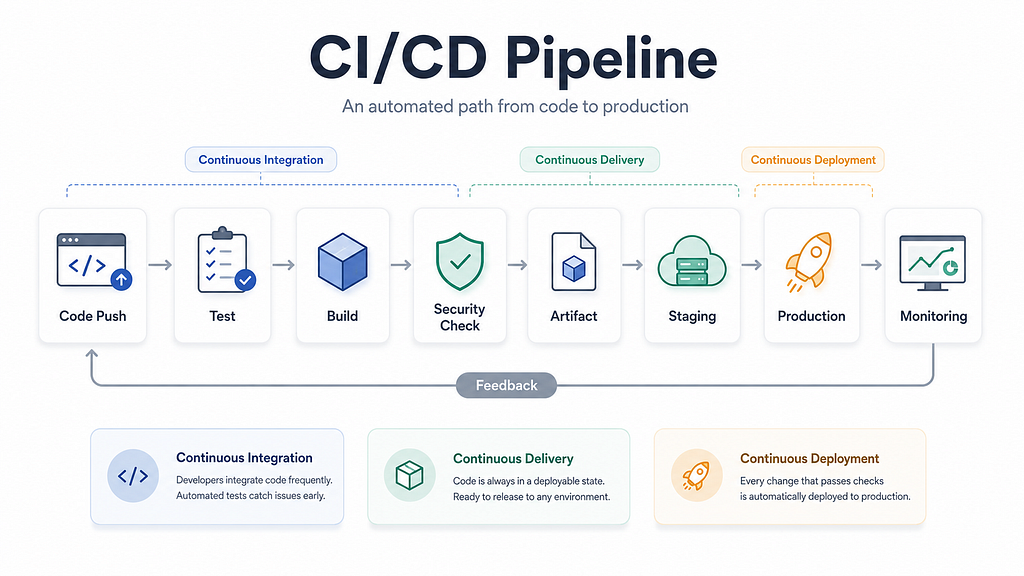
The code moves through stages such as:
- Installing dependencies
- Checking code quality
- Running automated tests
- Building the application
- Creating a deployment package
- Deploying the application
- Verifying that it works
If one stage fails, the pipeline usually stops.
This prevents broken code from reaching users.
What Does CI/CD Mean?
CI/CD usually refers to:
- Continuous Integration
- Continuous Delivery
- Continuous Deployment
Although they are related, they are not identical.
Continuous Integration
Continuous Integration, or CI, means developers frequently merge their changes into a shared repository.
Whenever code is pushed, an automated pipeline may:
- Install dependencies
- Check formatting
- Run tests
- Build the application
- Scan for security problems
If something fails, the developer receives feedback immediately.
The main purpose of CI is to detect problems early.
A simple CI workflow looks like this:
Developer pushes code → pipeline starts → tests run → build runs → results are reported
Continuous Delivery
Continuous Delivery extends CI.
After the code passes testing and builds successfully, it is prepared for deployment.
The application remains ready to release, but deploying it to production usually requires manual approval.
The process looks like this:
Code pushed → tests pass → application builds → release is prepared → human approves deployment
Continuous Delivery is useful when a company requires approvals, release windows, or compliance checks.
Continuous Deployment
Continuous Deployment goes one step further.
When all tests and checks pass, the application is deployed to production automatically.
The workflow becomes:
Code pushed → tests pass → build succeeds → application is deployed automatically
Continuous Deployment can make releases faster, but it requires reliable testing, monitoring, and rollback mechanisms.
Continuous Delivery vs Continuous Deployment
The difference is the final production step.
Continuous Delivery: deployment is ready, but a person approves it.
Continuous Deployment: deployment happens automatically.
What Triggers a Pipeline?
A pipeline starts when a specific event occurs.
Common triggers include:
- Pushing code
- Opening a pull request
- Merging a pull request
- Creating a release tag
- Running the pipeline manually
- Running it on a schedule
For example, a team may run tests for every pull request but deploy only when code is merged into the main branch.
For Linux tasks that run outside the pipeline platform, use the online cron editor to validate the five-field schedule and preview its upcoming run times.
Common Pipeline Stages
1. Source
The pipeline downloads the latest code from GitHub, GitLab, Bitbucket, or another repository.
2. Install Dependencies
The pipeline installs the libraries needed by the application.
For example:
npm ci
or:
pip install -r requirements.txt
3. Code Quality Checks
The pipeline may run linting, formatting, type checking, or static code analysis.
4. Automated Testing
The pipeline may run:
- Unit tests
- Integration tests
- End-to-end tests
- Security scans
If an important test fails, the pipeline stops.
5. Build
The pipeline converts the source code into something deployable.
This could be:
- A compiled application
- A JAR file
- A static website
- A Docker image
- A deployment archive
6. Deployment
The application is deployed to a development, staging, or production environment.
7. Verification
The pipeline checks whether the deployed application is healthy.
For example:
curl --fail https://example.com/health
A successful deployment command does not always mean the application is working, so this step is important.
A Complete Example
Imagine a developer adding a new login feature.
The process may look like this:
- The developer writes the code.
- The developer pushes it to GitHub.
- The pipeline starts.
- Dependencies are installed.
- Code quality checks run.
- Automated tests run.
- The application is built.
- A Docker image is created.
- The image is deployed to a test environment.
- Health checks verify the deployment.
- The application is approved and deployed to production.
Without a pipeline, someone would need to run many of these steps manually.
With CI/CD, the process becomes repeatable and consistent.
A Simple GitHub Actions Example
name: CI Pipeline
on:
  push:
    branches:
      - main
  pull_request:
    branches:
      - main
jobs:
  test-and-build:
    runs-on: ubuntu-latest
    steps:
      - name: Download source code
        uses: actions/checkout@v4
      - name: Set up Node.js
        uses: actions/setup-node@v4
        with:
          node-version: "20"
      - name: Install dependencies
        run: npm ci
      - name: Run tests
        run: npm test
      - name: Build application
        run: npm run build
This pipeline runs whenever code is pushed to the main branch or when a pull request targets it.
It downloads the code, installs dependencies, runs tests, and builds the application.
If any command fails, the pipeline fails.
What Happens When a Pipeline Fails?
Pipeline failures are normal.
A failure usually means an automated check found a problem.
Common reasons include:
- A test failed
- The application did not build
- A dependency could not be downloaded
- A configuration file was invalid
- A secret was missing
- The deployment failed
- The health check failed
The developer reviews the logs, fixes the issue, and pushes another change.
The pipeline then runs again.
Why Use CI/CD?
CI/CD pipelines provide several benefits.
Faster Feedback
Developers discover problems soon after pushing code.
Fewer Manual Errors
Automation reduces forgotten commands and inconsistent deployments.
Better Code Quality
Tests and quality checks run regularly.
Faster Releases
Teams can release smaller changes more frequently.
Consistent Deployments
The same process runs every time.
Better Traceability
Teams can identify which commit was built, tested, and deployed.
Common CI/CD Tools
Popular CI/CD tools include:
- GitHub Actions
- GitLab CI/CD
- Jenkins
- Azure Pipelines
- Bitbucket Pipelines
- Argo CD
- Tekton
These are tools used to implement CI/CD.
CI/CD itself is the process.
CI/CD Is Not Magic
A CI/CD pipeline is simply a structured sequence of automated steps.
It usually follows this flow:
Code pushed → tests run → application builds → artifact is created → application is deployed → deployment is verified
Continuous Integration checks code changes early.
Continuous Delivery keeps the application ready for release.
Continuous Deployment releases successful changes automatically.
Once you understand the workflow, CI/CD stops looking like a mysterious DevOps concept.
It becomes what it really is:
An automated assembly line for delivering software safely and consistently.