What is GitOps and why do you need it?
If you are learning or working in the cloud, chances are that you might have heard about GitOps. So what is GitOps?
If you are learning or working in the cloud, chances are that you might have heard about GitOps. So what is GitOps?
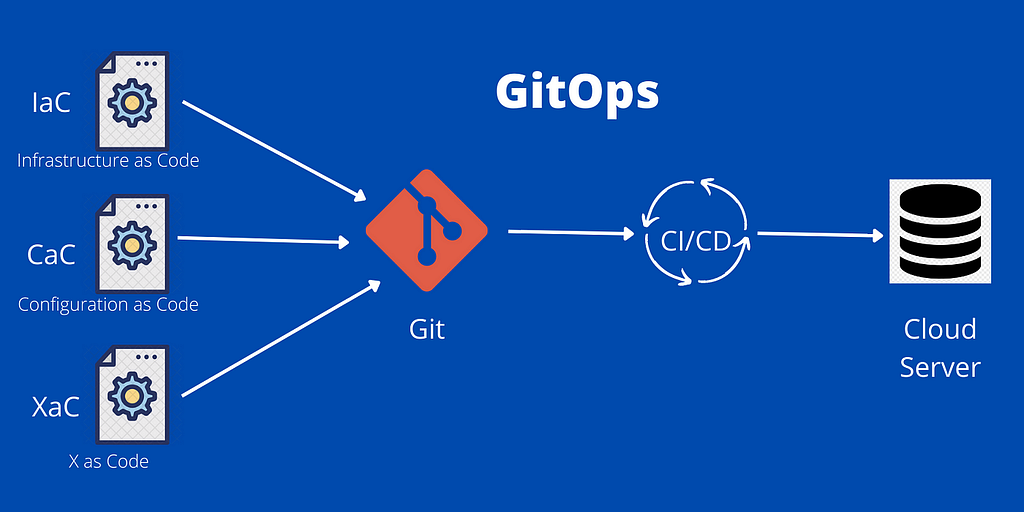
Before let’s get into a short introduction about IaC (Infrastructure as Code)
Entire infrastructures like AWS environments are managed through code. The infrastructure is defined using code. What needs to be built and how it needs to be built in the infrastructure is defined here. Tools like Terraform and Ansible help us.
It’s the blueprint.
We can version control them in Git and track changes and have a centralized location where everyone has access to it.
But here come the problems:
- No pull requests
- Directly merging to main without reviews
- No code reviews/collaboration
- No automated tests (invalid YAML files could be present)
- Everyone has access to the infrastructure and they can apply the changes from their local machine.
- Nobody knows who executed what on the remote servers.
- Mistakes in the files will be only found out once they are applied.
GitOps comes to solve these problems. It treats the IaC the same way Application as Code is treated.
- IaC is stored on a Git repository.
- Branch out to a new branch and work on the changes.
- The changes are validated by a CI pipeline which validates the configuration files and runs automated tests.
- Other team members can approve the final changes.
- Then a CD pipeline deploys it to the infrastructure.
GitOps has two ways of deployment to the infrastructure.
- Push Deployment
- Pull Deployment
Push deployment is the usual concept where the changes are pushed to the intended environment from the repository.
Pull deployment is where an agent is installed in the environment which pulls the changes from the Git repository.
The agent monitors and compares the desired state from the Git repository with the actual state in the environment where it’s running. If it notices any changes, it will pull the changes and make the actual state transition to the desired state.
Examples of pull based GitOps tools are FluxCD and ArgoCD.
Rollbacks: If you changes break the running environment, you can simply revert to the last working state by using git revert and rolling back.
Increases security because many team members don’t need direct access to environments to make changes, because it’s only the CD pipeline that’s going to make the changes. Anybody can propose changes by pull requests in the Git repository.
GitOps workflows are definitely recommended to optimize your workflow, so you should be trying them out.