Getting started with Ansible Automation
This guide will explore the initial steps to get started with Ansible automation in your projects. The main focus of Ansible is to automate redundant tasks that need to be performed over and…

This guide will explore the initial steps to get started with Ansible automation in your projects. The main focus of Ansible is to automate redundant tasks that need to be performed over and over again in multiple environments. Ansible executes tasks over SSH.
After installing Ansible edit your /etc/ansible/hosts file to update the set of servers or nodes that Ansible is going to access.
[servers]
172.16.20.9 ansible_user=user
ansible_user is used to set the name of the SSH user.
Testing the connectivity
Once you have configured the node address, test the connectivity and make sure that the endpoint is reachable.
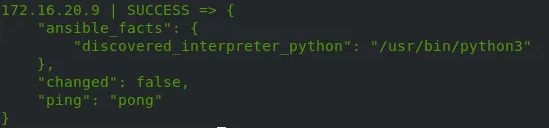
ansible all -m ping — ask-pass
Use — ask-pass if you are using a password-based login and enter the password in the interactive shell.
Use — private-key=/path/to/your/private_key if you are using a key-based login.
You should get a response similar to the below image:
Playbook initialization
- name: Name of the playbook
  hosts: all
  vars:
    copy_operations:
      - src: source_file_1_location
        dest: destination_file_1_location
        remote_src: yes
      - src: source_file_2_location
        dest: destination_file_2_location
        remote_src: no
name: Name of the playbook
hosts: The set of hosts where the tasks are going to be executed.
vars: The set of variables. copy_operations is the name of a variable.
Variables can have contents like sub-variables.
Since we are going to initiate a copy task, the variables are named in that context. Variable names can be of any choice of the user.
src: Defines the location of the source file.
dest: Defines the location of the destination file.
remote_src: States whether the source file resides in the managed node. If yes, the file will be copied from the managed node, or else from the control node.
Copying files
- name: Copy directories recursively using shell
  ansible.builtin.shell: "cp -a {{ item.src }}/. {{ item.dest }}"
  loop: "{{ copy_operations }}"
  loop_control:
    label: "Copying {{ item.src }} to {{ item.dest }}"
The following task will copy the files using the ansible.builtin.shell module.
loop: The variable set for which the looping will occur.
loop_control: Defining what should be done with each item in the loop.
label: Logging information about the ongoing task.
Checking if the destination directories exist
What if the destination directories do not exist in the first place when initiating the copy operations? Therefore, we should make sure that they exist.
# Check if destination directories exist
    - name: Check destination directories
      ansible.builtin.stat:
        path: "{{ item.dest }}"
      loop: "{{ copy_operations }}"
      register: dest_dir_check
      loop_control:
        label: "Checking {{ item.dest }}"

    - name: Display destination directory check results
      ansible.builtin.debug:
        msg: "Dest: {{ item.item.dest }} | Exists: {{ item.stat.exists }}"
      loop: "{{ dest_dir_check.results }}"
      loop_control:
        label: "Checking result for {{ item.item.dest }}"
Using the ansible.builtin.stat module, we are checking the presence of the directories.
path: The location where the files are going to be checked.
register: The variable where the result of this task is going to be stored.
loop_control:Defining a task that gets executed with each iteration of the loop.
label: Logging information about the ongoing task.
The ansible.builtin.debug module is used to display the output of the previous operation.
Creating the missing directories
# Create missing directories
    - name: Create missing destination directories
      ansible.builtin.file:
        path: "{{ item.dest }}"
        state: directory
        owner: user
        group: user
        mode: '0755'
      loop: "{{ copy_operations }}"
      when: >-
        not (dest_dir_check.results
        | selectattr('item.dest', '==', item.dest)
        | map(attribute='stat.exists')
        | first)
      loop_control:
        label: "Creating {{ item.dest }}"
Here the ansible.builtin.file module is used to create the missing directories.
path: The directory to be created
state: The type of file
owner: Owner of the file
group: Group of the file
mode: Access permissions for the file
when: Handles the logic of creating the directories only if they are missing. The previously configured dest_dir_check variable is used here.
Finally the directories get created.
Final playbook
---
- name: Backup mchoice-smsc directories with preservation
  hosts: all
  become: yes
  become_user: user
  vars:
    copy_operations:
      - src: source_file_1_location
        dest: destination_file_1_location
        remote_src: yes
      - src: source_file_2_location
        dest: destination_file_2_location
        remote_src: no

  tasks:
    # Check if destination directories exist
    - name: Check destination directories
      ansible.builtin.stat:
        path: "{{ item.dest }}"
      loop: "{{ copy_operations }}"
      register: dest_dir_check
      loop_control:
        label: "Checking {{ item.dest }}"

    - name: Display destination directory check results
      ansible.builtin.debug:
        msg: "Dest: {{ item.item.dest }} | Exists: {{ item.stat.exists }}"
      loop: "{{ dest_dir_check.results }}"
      loop_control:
        label: "Checking result for {{ item.item.dest }}"

    # Create missing directories
    - name: Create missing destination directories
      ansible.builtin.file:
        path: "{{ item.dest }}"
        state: directory
        owner: user
        group: user
        mode: '0755'
      loop: "{{ copy_operations }}"
      when: >-
        not (dest_dir_check.results
        | selectattr('item.dest', '==', item.dest)
        | map(attribute='stat.exists')
        | first)
      loop_control:
        label: "Creating {{ item.dest }}"

    # Copy directories
    - name: Copy directories recursively using shell
      ansible.builtin.shell: "cp -a {{ item.src }}/. {{ item.dest }}"
      loop: "{{ copy_operations }}"
      loop_control:
        label: "Copying {{ item.src }} to {{ item.dest }}"
Final thoughts
This is just a small demonstration of what Ansible is capable of. Further automation can be done according to the user’s requirements. Feel free to explore more topics about automation with Ansible, and stay tuned for more updates about automation.